
ADA Title II document remediation
Every document. Every reader.
EveryReader makes every PDF, Word file, slide deck, and spreadsheet on your public website readable with a screen reader, to the WCAG 2.1 AA standard in the ADA Title II rule. Then it proves it, with a record for every file, signed off by a person.
Built for school districts, cities and towns, colleges, counties, and special districts.
- Validated to PDF/UA-1 with veraPDF
- Reviewed and signed off by a person, by name and date
- Your words are never rewritten
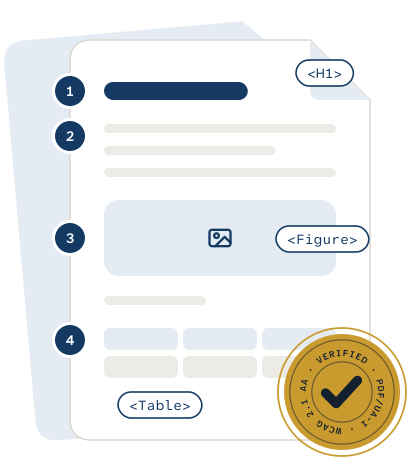
The rule covers your documents, not only your web pages.
The Department of Justice's ADA Title II rule requires the web content of state and local governments, including public schools and colleges, to meet WCAG 2.1 Level AA. That includes the PDFs, forms, and other files you post or link to, with limited exceptions. Anything you post after your date has to be accessible when it goes up.
Dates as amended by the DOJ interim final rule of April 20, 2026. A federal lawsuit filed in May 2026 asks the court to restore the original, earlier dates. General information, not legal advice. Last reviewed October 19, 2026.
- April 26, 2027 Public entities with a total population of 50,000 or more
- April 26, 2028 Entities under 50,000, and all special district governments
Perfect on screen. Unreadable aloud.
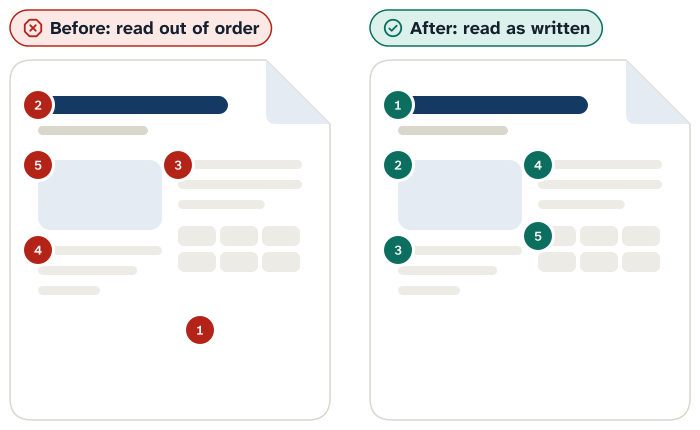
More than 1 in 4 U.S. adults has a disability, according to the CDC. When a PDF has no structure, a screen reader can't tell a heading from a footnote, read a table in order, or describe a chart. Here is the same board agenda, read aloud before and after EveryReader.
Before: a screen reader guesses
“Seven thirty P M. Budget twenty twenty six twenty seven. Image. Call to order approval of minutes superintendent report. Item amount four one two zero zero zero zero…”
Out of order, and nothing is named. No headings to jump between, the seal is just “image,” and the budget table becomes a string of numbers.
After EveryReader
“Heading level 1: Regular meeting of the Board. Graphic: district seal. Heading level 2: Agenda. List, 4 items. Call to order, 7:30 PM. Table, 3 columns, 4 rows: Item, Amount, Vote…”
Read in order, with structure. Headings to navigate by, a described image, a real list, and a table with headers. The words are exactly the original.
Who an inaccessible document shuts out
- Residents who are blind or have low vision use screen readers and magnification, which need real text, headings, and reading order.
- People with dyslexia, ADHD, or other learning disabilities rely on clear structure and text-to-speech to follow a long policy or a form.
- Parents and grandparents read school notices on a phone with large text, often in a hurry.
- People who can't use a mouse move through a document with a keyboard or voice control, so every field and link must be reachable.
- Families who speak another language at home translate documents with tools that only work on real text, not a picture of it.
The law is the floor. Your residents are the reason.
Careful or fast. Now you get both.
A public website can hold anywhere from dozens to thousands of documents, most exported straight from Word or scanned, and new agendas, minutes, and notices go up every week. The usual ways to fix them force a trade-off.
-
Careful
Manual remediation
Specialists tag each file by hand. Careful work, but slow at the scale of a whole website, and next week's meeting packet joins the queue.
-
Fast
Automated tagging alone
One-click tools guess at structure from font sizes and positions, and no one stands behind the result. A green checkmark from a checker is a start, not proof.
-
Both
EveryReader
Software does the heavy lifting, AI rebuilds each page's structure, and a person signs off on every file. Careful and fast, with proof for each document.
Six steps from found to signed off.
EveryReader finds and audits every document on your public website, uses AI to rebuild each file's structure, then validates the result and compares every word with your original. A person reviews each file and signs off before you download it.
-
Discovered
Done by: Software
Our crawler, EveryReaderBot, finds every PDF, Word file, slide deck, and spreadsheet on your public site and on the vendor sites it links to, like agenda and payment portals. It honors robots.txt and never logs in or submits forms.
-
Audited
Done by: Software
Each file is checked for tags, real text, a title, a language, embedded fonts, and contrast, then sorted into priority tiers. Some are better archived or removed than fixed, and we say so.
-
Remediated
Done by: AI
AI reads each page the way a sighted person does and rebuilds the structure: headings, lists, tables, reading order, alternative text, and language. Scanned pages get text recognition first.
-
Verified
Done by: Software
veraPDF validates every file against PDF/UA-1, the ISO standard for accessible PDFs. Contrast is checked again, and every word is compared with the original. Any difference goes to a person.
-
Human review
Done by: A person
A reviewer, from our team or yours, checks alt text, reading order, and table headers, listens to a sample of high-priority documents in a screen reader, and signs off by name and date.
-
Delivered
Done by: You
You download five files per document from your portal, plus a combined conformance summary for your board or your ADA coordinator.
“Advanced technology, such as generative AI, does not yet reliably automate the remediation of inaccessible content at scale, and staff resources and availability continue to pose significant challenges.”
We agree, so we never sell AI on its own. Software proves what can be proven, and a person makes every judgment call.
Start with an audit. Fix what people use first.
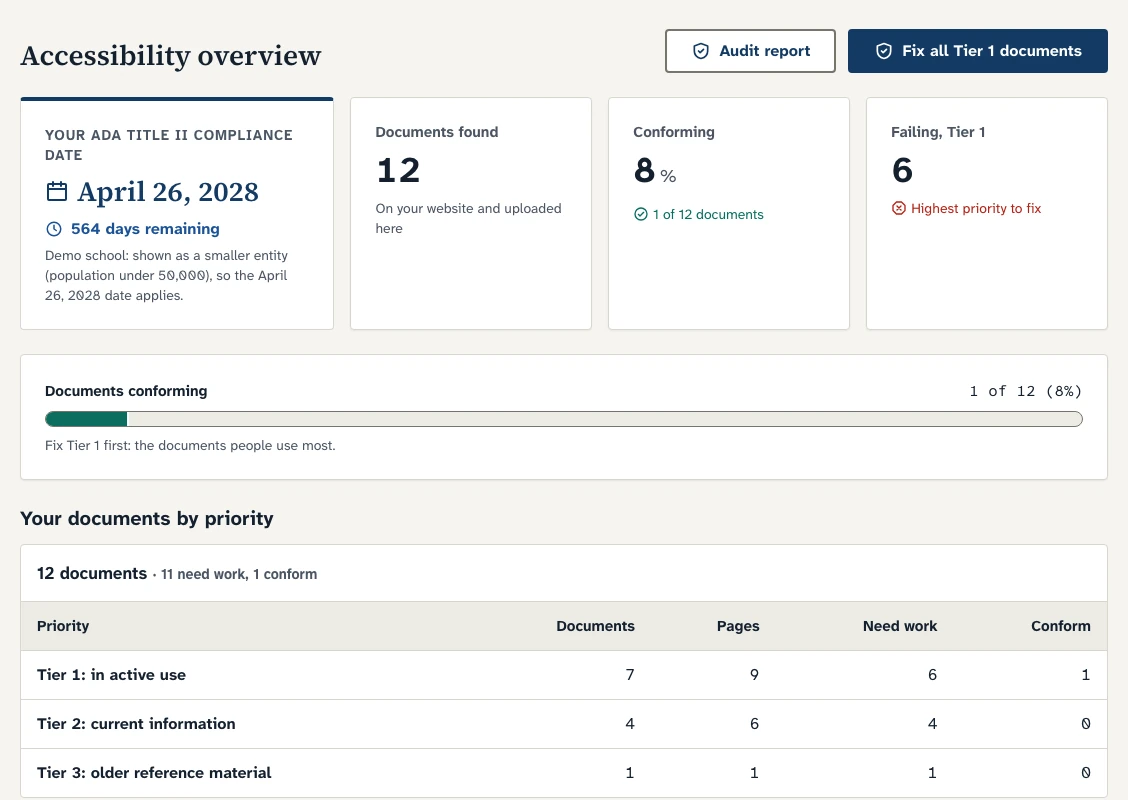
Your audit lists every document on your site and sorts each one into a priority tier, so the files families and residents depend on today get fixed first. It also flags documents that may qualify for the archive exception, so you don't spend time fixing what doesn't need it.
Tier 1: in active use
Fix firstForms, applications, handbooks, current policies, notices, and current-year schedules. The exception for older documents never applies to these, no matter when they were posted.
Tier 2: current information
Reports, plans, newsletters, and similar documents people read but don't need in order to use a service. Covered, and fixed after Tier 1.
Tier 3: older reference material
Past minutes, prior-year budgets and audits, and old newsletters. Often a candidate for a clearly labeled archive, or for removal.
Five files for every document. One complete record.
When a resident, a board member, or the Department of Justice asks whether a document is accessible, you can answer with evidence, file by file.
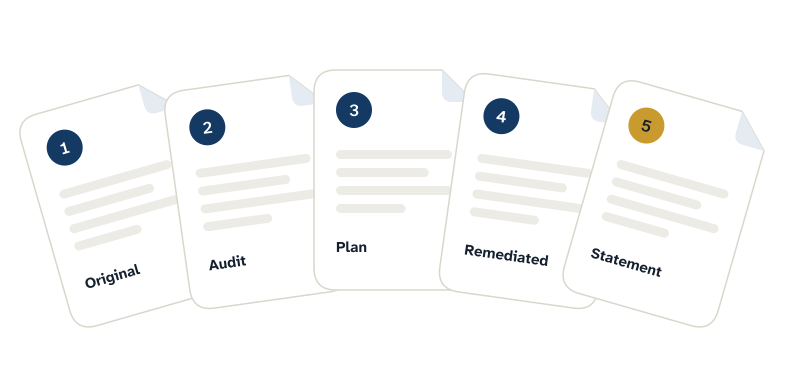
-
Original document
Kept unchanged and fingerprinted, so there's never a question about where we started.
-
Original audit
Every issue in plain language, with its WCAG 2.1 criterion and PDF/UA clause, and a recommendation: fix, archive, web page, or remove.
-
Remediation plan
What we changed and why: structure, alternative text, tables, forms, and metadata.
-
Remediated document
A tagged PDF, plus HTML and Word versions when we rebuild the file, so your staff can maintain it.
-
Final audit and conformance statement
Validation results, a word-by-word comparison with the original, and the reviewer's name and date.
Plus a combined conformance summary you can hand to your board.
Your words stay your words.
EveryReader rebuilds structure, never content. AI proposes headings, lists, tables, reading order, alternative text, and language. Then every fixed file is compared word by word with the original, and if anything differs, even a single word, a person resolves it.
- Validated against PDF/UA-1 with veraPDF
- Checked against a WCAG 2.1 AA document checklist for what PDF/UA doesn't cover, like contrast, alt text quality, and link purpose
- Scanned pages recognized as text and proofread
- Sealed only after a named reviewer signs off. No sign-off, no seal.
Case study
One school's policy library: 29 of 29 now pass.
A public school publishes its policies as PDFs: 29 documents, 498 pages in all. Current policies are documents in active use, so the exception for older documents doesn't cover them. After a first manual remediation pass, 23 of the 29 passed validation. After EveryReader remediation and human review, all 29 pass PDF/UA-1, each delivered with its full five-file record.
Check your site- 29policy documents remediated
- 498pages in all
- 23 to 29passing PDF/UA-1 validation, before and after
- Every onereviewed by a person before delivery
Choose who does the review.
Every document gets the same AI remediation, the same automated checks, and the same five files. What changes is who reviews each one and signs off.
-
Done for you
We remediate, review, and verify every document. A Purely Works reviewer signs off, and you take a final look before anything goes on your website.
A good fit when your team is short on time before the deadline.
-
Shared review
We remediate and run every automated check. Your staff review each document in your portal and approve it, or flag a change for us to fix. Along the way, your team learns to keep new documents accessible.
A good fit for high volumes, or when you have staff who can review.
Add monitoring to either one, and we'll rescan your website every month for new and changed documents.
Stay accessible after the deadline.
Agendas, minutes, and notices keep coming, and documents posted after your compliance date have to be accessible when they go up.
-
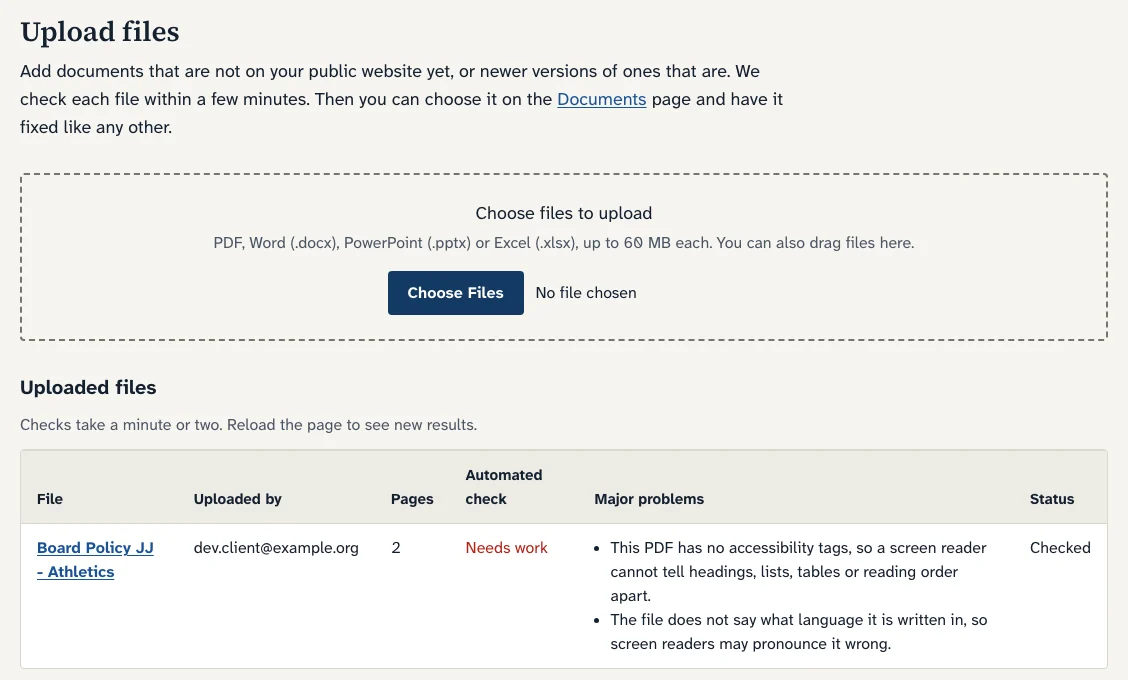
Upload before you post
Drag in a PDF, Word file, PowerPoint, or Excel file. Your portal checks it within a few minutes, and you can have it fixed like any other document.
-
Monthly monitoring
With monitoring, we rescan your website every month, compare it with the last scan, and email you a list of new and changed documents with their priority.
-
A record that keeps itself
Your portal keeps the full history: what was found, fixed, and delivered, with the proof for each file. Colleagues join with a verified work email.
Built for public entities and the people they serve.
Each kind of public entity has its own deadline, its own documents, and its own people doing the work.
School districts
Enrollment forms, IEP notices, handbooks, and minutes. Every family can read what the district sends home.
Cities and towns
Permits, meeting packets, budgets, and bylaws. Every resident can take part in town government.
Colleges and universities
Catalogs, policies, forms, and course materials. Every student can read the catalog, the policy, and the form.
Counties and special districts
Housing, transit, utilities, and county services. Every resident can use the services you provide.
Also built for charter, regional, and vocational-technical schools, educational collaboratives, public libraries, housing and transit authorities, and state agencies.
Software with a team behind it.
EveryReader is built and run by Purely Works, a team that builds AI tools for school districts, schools, and colleges. It started with one school's policy documents and a hard question: how does a small staff fix every file before the deadline, and prove it?
When you need more than documents, we're already in the room: family communications, grants, accreditation, and custom tools for your staff. See our education work
A walkthrough of your audit
We go through your audit with you in plain language, in about 30 minutes, and agree on what to fix first.
A person on every file
Our reviewers or your staff check and sign off on every document. Nothing is delivered without a person's name on it.
Held to the standard we sell
The EveryReader website and portal aim to conform to WCAG 2.1 AA, and every handout we publish passes PDF/UA-1 validation.
Questions we hear most
What is EveryReader?
EveryReader is an ADA Title II document remediation service from Purely Works. It finds every PDF, Word file, slide deck, and spreadsheet on a public website, makes each one readable with a screen reader to WCAG 2.1 Level AA, and delivers a record for every file, signed off by a person.
Who has to comply with ADA Title II, and by when?
State and local governments, including public school districts, charter schools, public colleges, public libraries, and special districts. As amended in April 2026, entities with a total population of 50,000 or more must comply by April 26, 2027. Smaller entities and all special district governments must comply by April 26, 2028.
Does EveryReader use AI? Who checks its work?
Yes. AI rebuilds each document's structure. Software then validates the file and compares every word with your original, and a person reviews it and signs off before delivery. The Department of Justice has said AI doesn't yet reliably automate this work at scale. We agree, so we never sell it alone.
Is EveryReader an accessibility overlay?
No. An overlay adds a widget on top of a web page. EveryReader fixes the documents themselves, so each file works in a screen reader wherever it's opened or downloaded.
Will you change what our documents say?
No. AI never rewrites your text. Every fixed file is compared word by word with the original, and any difference, even a single word, goes to a person before delivery.
Who reviews the documents, your team or ours?
You choose. With Done for you, a Purely Works reviewer signs off on every document and you take a final look. With Shared review, your staff review each document in your portal and approve it or flag a change for us. Both include the same checks and the same five files.
Do we have to fix every old document?
Not always. The rule has exceptions, including clearly labeled archives for older material that no one needs in order to use a service. Your audit flags archive candidates, and we'll tell you what not to fix. Forms and other documents in active use don't qualify, no matter when they were posted.
What about documents we post after our compliance date?
They need to be accessible when they go up. Upload a file to your portal and it's checked within a few minutes. With monitoring, we also rescan your website every month and send you a list of new and changed documents, with their priority.
Which file types and standards do you cover?
PDFs, Word files, PowerPoint decks, and Excel spreadsheets, including scanned PDFs. We test against WCAG 2.1 Level AA, the standard in the ADA Title II rule, and validate PDFs against PDF/UA-1 with veraPDF.
Do you need access to our website or systems?
No. To check your site, we need only its address, your name, and your work email. EveryReaderBot reads public pages only, honors robots.txt, and never logs in or submits forms. You download fixed files from your portal and post them yourself, so nothing on your site changes without you.
Is this legal advice?
No. EveryReader does the technical work and keeps a record of it. For questions about your obligations, such as which compliance date applies to your organization, we recommend confirming with your counsel.
Every reader deserves the agenda, the budget, and the form.
Tell us your organization's website and your work email. EveryReaderBot audits every PDF, Word file, slide deck, and spreadsheet it finds, and we show you what to fix first.
-
Your report
Your compliance date, every document by priority, and the most common problems, in your portal.
-
A 30-minute walkthrough
We go through the full audit with you and agree on what to fix first.
-
A sample document
We fix one of your documents, so you can see the result and its five files.
Takes about two minutes. Use your work email, so only your colleagues can see the results.